I Built the Writing App of My Dreams
This Just In: If you’re super precise and patient (and maybe a little insane), you can completely customize your workflow.

First of all, let me take a moment to retract a passage from my book:
Find an app that works for you, and then stick with it, even if it’s not absolutely perfect. Determine your bare minimum feature set and find something that does that. I require a distraction-free environment, Markdown support, local storage with device syncing, and the ability to export to multiple formats.
I wrote that passage believing no app can be truly perfect. You play a game of give and take with every piece of software — you give up your understanding of how it should work and adapt to the way the thing actually works. In most cases, you settle for "good enough."
I decided "good enough" was no longer, well, good enough and started looking into what it would take to create the writing app I've always wanted. Reader, I now think it is possible to achieve perfection!
Why, because I built an app that is rooted in Markdown, syncs with Ghost, saves versions, and answers questions based on my writing!
Stick around to learn about what I built, why I built it, and how you can get your hands on it.
App Architecture Isn't Easy
Anything related to AI is pretty charged, but I'm pretty clear about my stance — LLM's are not a tool to replace writing but they are able to support a writer's workflow. LLM's are also tools that can enable previously impossible or cost-prohibitive workflows.
I wanted to see if I could take my current writing workflow and use an LLM to turn it into a visually appealing personalized app, similar to what Casey Newton did a few months back. That workflow would require Markdown writing, using AI as a developmental editor, and (ideally) publish to Ghost.
I began a Claude Code session and basically asked if this was possible. Claude, unsurprisingly, said of course and started asking questions. Within about a day, I had a fully functional Markdown editor that worked with files on my computer. Pretty great, right? Well, that's when I realized just how deep this rabbit hole could go.
The problem with AI is that it doesn't understand intent, it only processes what it reads and predicts the next outcome. While the Markdown editor was pretty solid, everything else was pretty terrible. Oh, and it had a pretty significant data loss problem because I didn't explicitly tell the AI to build the app in a way that wouldn't overwrite entire files randomly. So, I guess that was on me.
In the many weeks and nearly two-thousand builds since that first Markdown editor, I've gained an insane amount of knowledge about "human interface guidelines," how to articulate features and design, and (most importantly), how to think about the architecture that allows software to function.
Each new feature or fix is essentially a new path that will inevitably prevent or impact a future decision. You obviously don't know what those future decisions are, but you have to think through what trade-offs they will require while building.
For example, saying I wanted the app to publish and edit Ghost posts seems pretty innocuous on the surface. But, go deeper and you realize that Ghost supports a whole host of content types that Markdown has no equivalent for. So, I needed to scope out a process that would take Ghost content from the API, convert it into a customized form of Markdown, and then reconvert it back to a format the Ghost API could read. To say I lost some files in the process of testing this is an understatement.
Building this app required hundreds of highly detailed roadmap items that I sketched out, trying to anticipate every possible use case or decision path. These decisions and their inevitable tweaking cost me hundreds of millions of tokens — not something a normal (or sane?) person will spend time or money on.
That said, I'm pretty proud of what I’ve built with Claude and Apple's Xcode. I've leaned a lot along the way, so much so that I even started the entire build over from scratch to change a fundamental architecture decision after learning more about Apple's core frameworks. The result is truly the unified writing app of my dreams and I can't wait to show it to you!
Introducing em — a Markdown Editor that Puts You in Control
Say hello to em — as in em dash — the greatest punctuation ever invented.
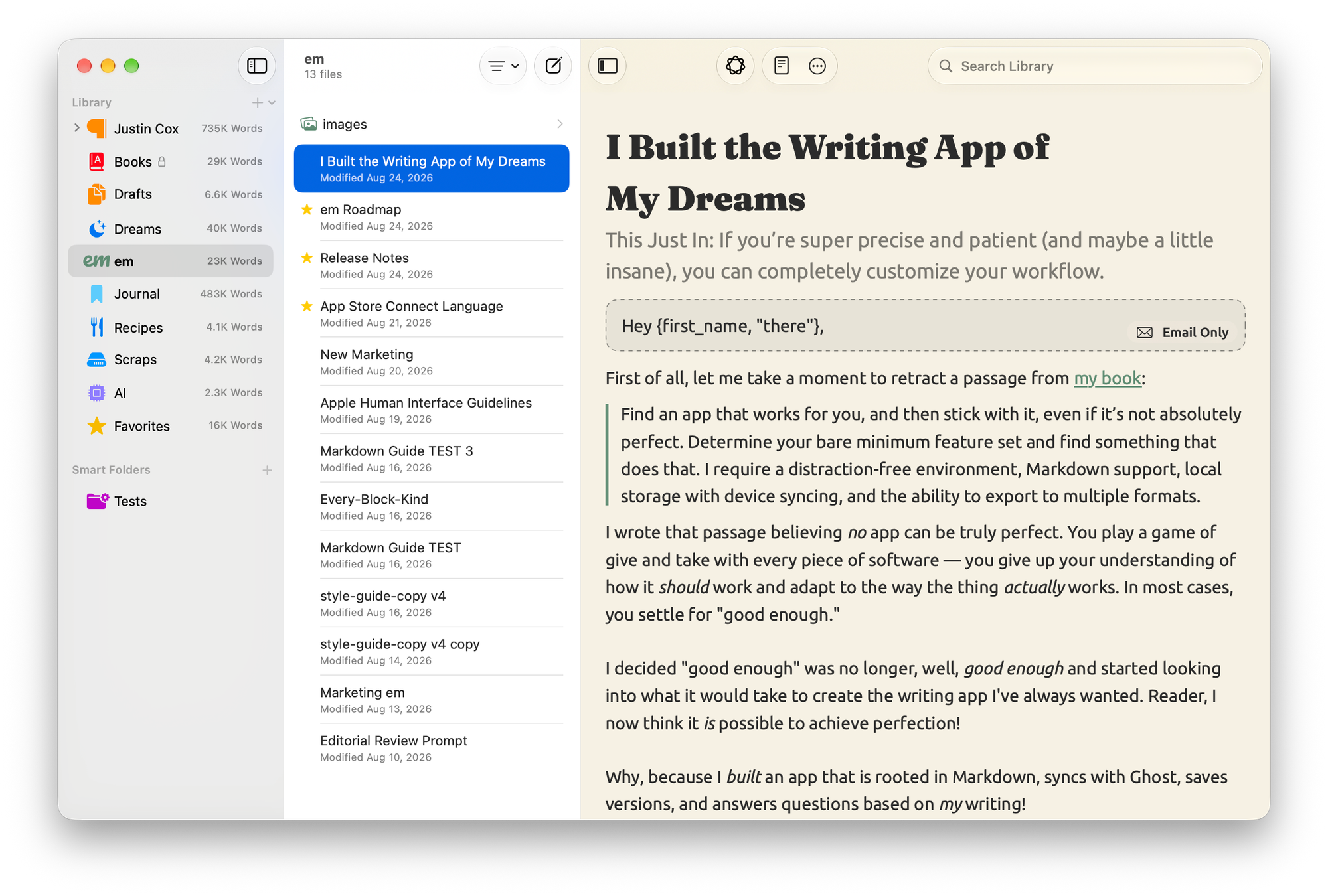
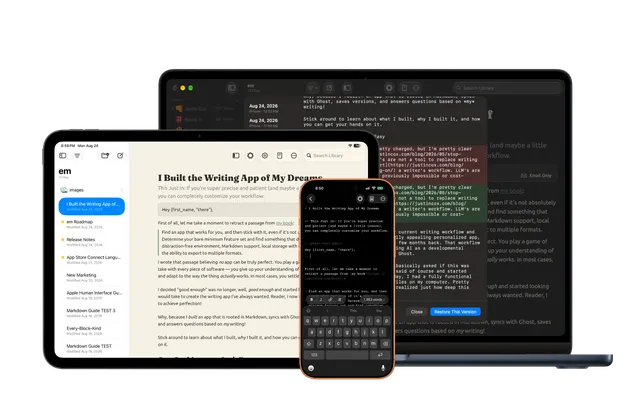
em is built for writers who have a ton of files who want to be the only one to decide what to do with 'em. It's a full-featured Markdown writing app with support for iCloud libraries and remote Ghost sites.
While em supports 16 native Ghost Koenig cards, publishing, scheduling, and email newsletters, the secret sauce is in em's intelligence features.
Smart Search allows searching your library for more than just words, and instead, search for meaning. Thanks to something super technical called chunk embedding, em indexes your library into small chunks that it can derive context from. This way if you want to search for when did I write about software development? you might get results that are also about building apps.
The beautiful part of all of this is that Smart Search is 100% on-device. It uses the same concept that powers Apple Mail's meaning-based search feature shipping with this year's operating system updates. Pretty cool, right?
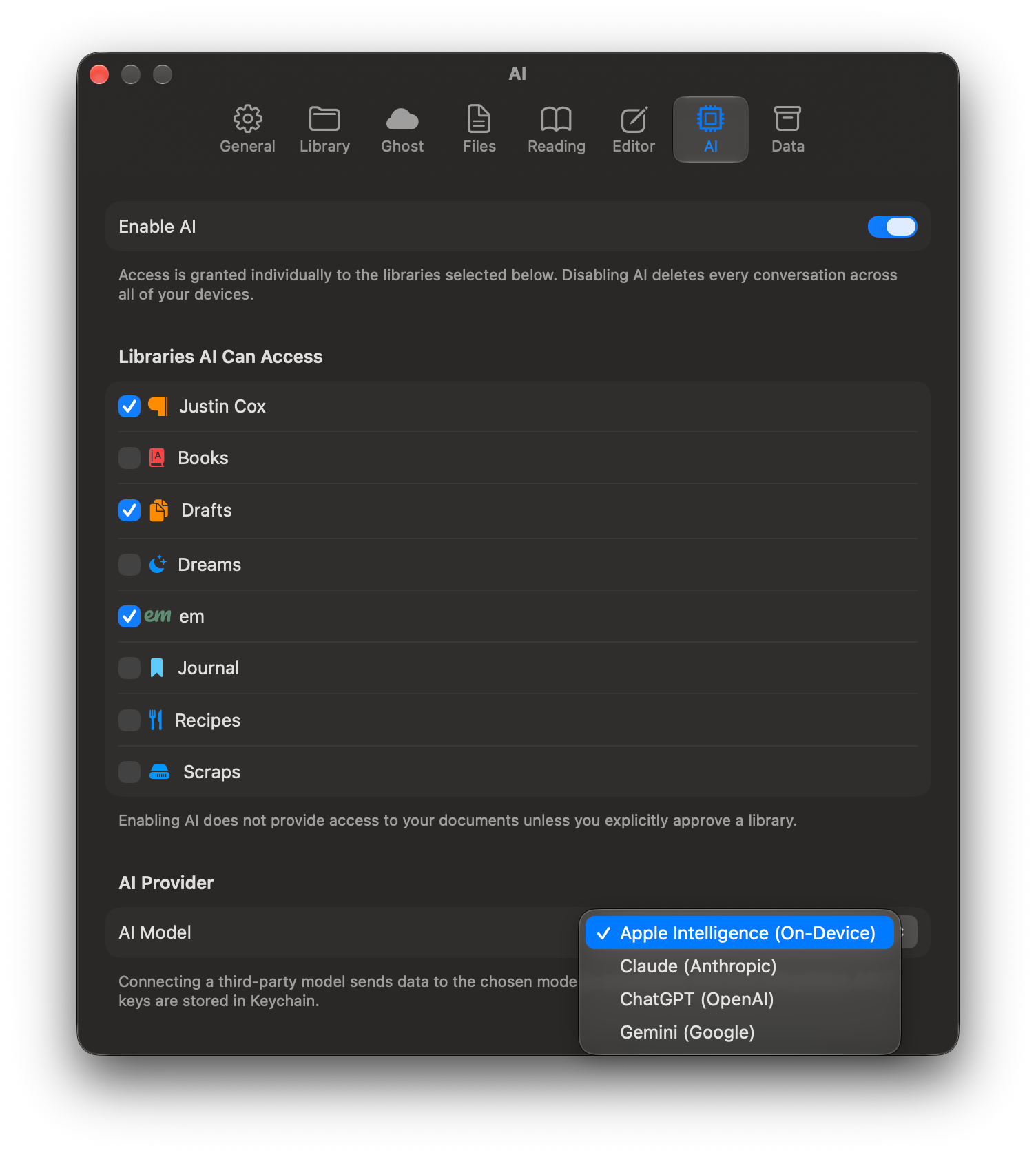
Despite the controversy surrounding AI and writing, I wanted to add AI features to em, but I wanted to do it in a completely measured way. AI features are fully disabled by default. Should a user want to enable AI, they pick the libraries it can access, and it starts with Apple's on-device Foundation Models. Granted, these aren't super powerful and have a context limit of 9,000 characters, but they are private and don't require an internet connection.
With Apple's Foundation Models and the semantic chunks that power Smart Search, the Ask em feature provides basic answers based completely on the content from your archive. Again, that 9,000 character context limit comes into play and has an impact on the results — I imagine Apple's model will get better over time.
For writers who want more powerful AI tools now, em also supports API connection to Claude, ChatGPT, and Gemini. Keys are saved in Keychain and the AI model only has access to the libraries you explicitly enable. Results to any question, regardless of the model, appear directly in em.
With AI turned on, em adds an Editorial Review tool that evaluates drafts based on a review prompt — the same one I've been using for about a year. The Foundation Model's small context is not big enough to handle the Editorial Review, so writers who don't want to use a third-party LLM can use Apple's Private Cloud Compute through Apple Shortcuts.
All AI conversations are stored as Markdown files in an AI library and can never generate text inside your documents. The feature exists to add support to your writing process, not replace it.
All AI features are completely optional and em is still pretty damn powerful without them.
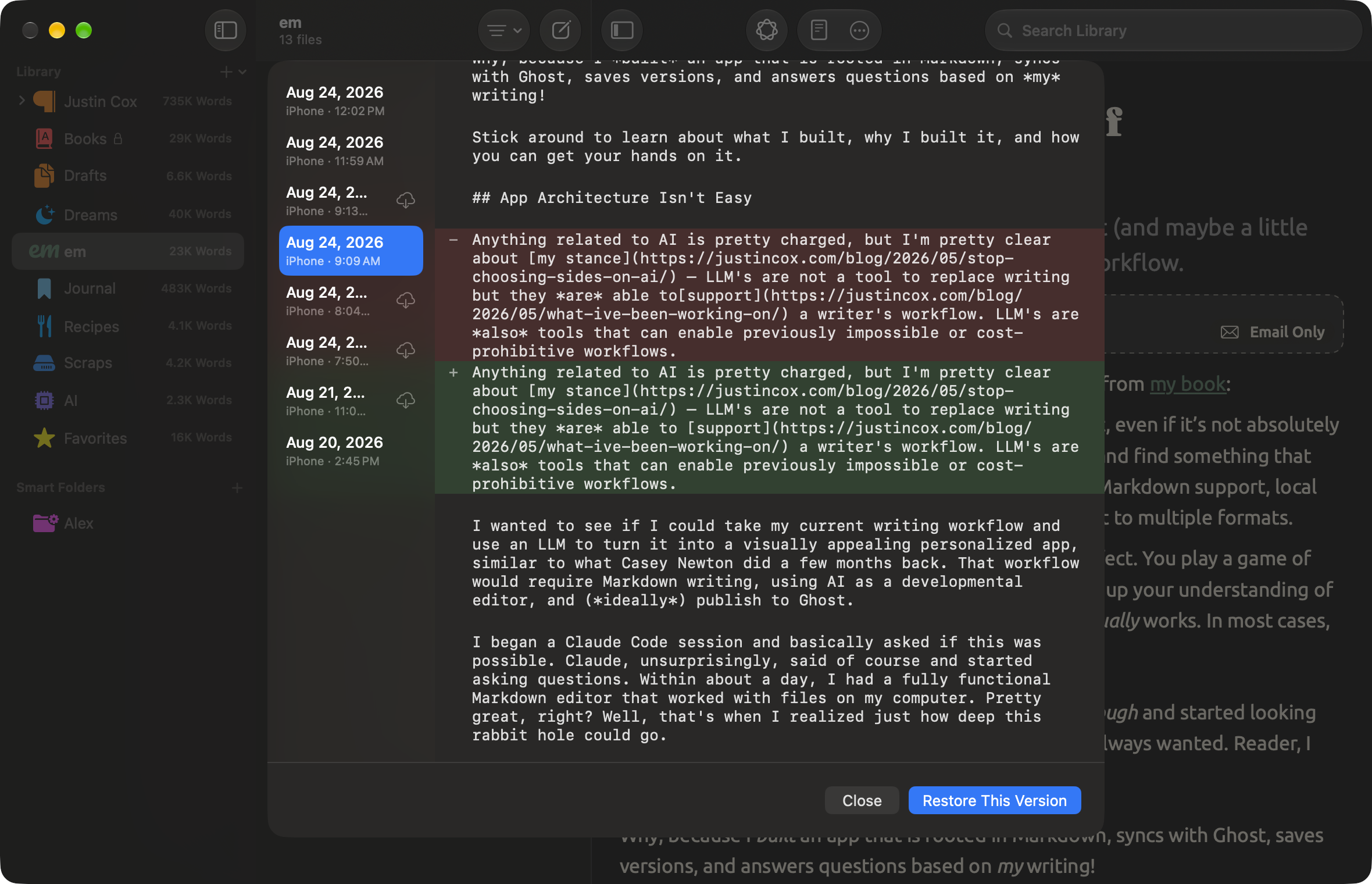
In addition to what I've already shared, em also includes a complete Version History tracking system. Every change you make across every device is saved so you can revert or restore whenever needed. All Versions are stored in iCloud and are only ever accessible to you. This feature was a direct result of losing all those drafts during the build process.
Oh, and it probably goes without saying that em also supports Apple’s Shortcuts and App Intents for far more than connecting to Private Cloud Compute, because it’s part of my non-negotiable list. Shortcuts can find, append, prepend, create documents, and even publish directly to Ghost. em enables you to build the writing workflow you've always wanted, too.
em is built with a privacy-first mindset. The app has no servers, no backend, and no way for me to ever access your data. Your writing is your writing and you should be the only one who decides what to do with it.
em is Now Available on An App Store Near You
em is the result of literally every non-working free hour I've had for weeks and weeks and it's something I'm pretty damn proud of. It truly is the writing app I've always wanted and has the polish and quality that I hold myself to.
I’ve refined every detail — each setting, button, and line of text — so that it feels like a true Mac-assed Mac app (and an iOS-assed iOS app for that matter). It’s a fantastic experience and just feels right on each device.
em is available through Apple’s App Store right now!
 Justin Cox
If you want to know more about em, I’ve also built a full marketing site to explain all of its features and its super clear privacy policy. Check it out at useem.app!
When I wrote my book, I said to "[f]ind an app that works for you, and then stick with it, even if it’s not absolutely perfect." Well, I want to recant that and say it's possible to build the perfect app if you're insanely diligent and maybe (probably) a little crazy. If you're anything like me, em will be the perfect writing app for you.
PS:
Here are a few answers to questions you might be asking:
Why is em always lowercase?
Why not? It looks better that way.
Why is em always bold?
That’s part of my newly adopted house style. When referring to em in my articles, it will always be done in bold.
Will em come to Windows or Android or Linux or insert_platform_here?
em will only be available for Apple devices — it's the ecosystem I use and understanding one development process was hard enough.
Will em support more than just Ghost in the future?
Maybe? It depends on API availability and my patience (and maybe user requests). If Medium opened their API again that would be a no-brainer. Maybe Tony or Scot are reading this...
What's with the icon?
Have you ever tried depicting an em dash by itself? This shit is super hard! I'm fully open to future suggestions and I might do a whole article on all the (really bad) steps it took to get where the icon currently lives.
PS 2
It should go without saying, but this article was written, edited, published, and sent using em. Welcome to the future of my writing flow!
Support Justin Cox
Become a paid supporter to help keep Justin Cox accessible to everyone.
Related Reads

What I Learned Building an App
This Just In: em is now available and ready for iOS and macOS 27! Here's what I learned getting it to this point.
I Built the Writing App of My Dreams
This Just In: If you’re super precise and patient (and maybe a little insane), you can completely customize your workflow.

Stop Choosing Sides on AI
This Just In: Holding two conflicting ideas about AI isn’t weakness. It's the only honest position.

AI Is Not an All or Nothing Choice
This Just In: AI use isn't a moral binary. There's a practical middle path for writers.

Unchecked Writing
This Just In: I stopped using Grammarly; have you noticed? Plus, a deeper exploration into AI writing and my friend the em dash.

Want to Write a Novel in November?
This Just In: NaNoWriMo may be dead, but writers have two new options to help hit those writing goals.

Is AI Really All That Bad?
This Just In: Here comes a potentially controversial opinion.

AI Exposes the Deeper Rifts in the Writing Industry
This Just In: Monetization turns passions into sweatshops and AI is making it worse.

AI Killed NaNoWriMo
This Just In: The writing month challenge may be dead, but there’s a new option to keep writers going.

A Few More Thoughts on Copyright
This Just In: The history of copyright might be fraught, but it exposes a bigger issue when creating online.

Copyright in the Age of AI
This Just In: What does copyright do and does it even matter anymore?

Is Reading Dying
This Just In: AI summaries and the pivot to video are bad news for the written word.
Are Apple’s Writing Tools the Right Stuff
This Just In: Apple Intelligence offers the boring version of AI I’ve hoped for, but is it helpful for writers?

Hitting the Reset Button
LLM scraping is a virus eating up the internet, but I’m done fighting. Instead, I choose open access and human connection.

Is Generative AI Destroying the Open Web
Subscription walls prevent AI scraping, but at what cost? I’m rethinking my whole publishing strategy.

Is Apple Intelligence the AI for the Rest of Us
This Just In: Apple’s forthcoming entry into AI promises a private, personalized AI, but will it increase AI slop?

Generative AI in Creativity
The reader survey results have some interesting things to say about generative AI and creativity. Here’s why that’s a problem.

What Is Your Freelance Writing Rate
Writing jobs are evaporating for many reasons, but freelance rates were really bad long before AI came around.

Can We Find a Balance With AI?
The dichotomy of AI continues to baffle me as I see the good and the bad. Where do we draw the line, and how do we learn to live with this technology?

Don’t Feed the AI Beast
This Just In: Justin’s writing requires a subscription to prevent AI abuse; consider your own precautions.

An Update on Spam Submissions
This Week In Writing, we talk about spam submissions to The Writing Cooperative and look at some of your thoughts on being called AI.

Would You Want to Know if I Thought Your Writing Sounded Like AI
This Week In Writing, we talk about submissions to The Writing Cooperative and how to avoid false accusations.

Saving Frequently Isn’t The Only Way To Backup Your Writing
This Week In Writing, we take a hard lesson from the latest Twitter/X hijinks. Plus, we look at what “human writing” means.

MIT Says ChatGPT Improves Bad Writing, But At What Cost?
This Week In Writing, we explore how ChatGPT and Grammarly are making us all sound the same.

AI Is Now Everywhere
This Week In Writing, we talk about Google’s new AI plan, what it means for writers, and why resistance is futile.

The Problem With Creative Entitlement
This Week In Writing, we explore how AI tools amplify the sometimes problematic relationship between creator and consumer

ChatGPT, the Writer’s Strike, and the Future of Content Writing
This Week In Writing, we explore a middle-of-the-road approach to ChatGPT and the future of writing
How I Use Midjourney to Create Featured Images for Articles
Generating unique and interesting featured images, you only need a Discord account and a little patience. Here’s how I use the tool.

AI Is Coming for Content Creators
This Week In Writing, we look at how AI is changing the content landscape and why that might be a good thing.

What Biases Do You Bring to Your Projects
This Week In Writing, we explore biases in our creative pursuits and how those biases can translate to AI-generated content.
Success Comes to Those Who Work for It (Usually)
This Week In Writing, we talk about success and perseverance through the lens of Simu Liu’s memoir. Oh, and AI writing, too.

Give Thanks to Our AI Overlords
This Week In Writing, we celebrate Thanksgiving and dive into the ever-improving AI-generated content.

This Just In: the Robots Are Coming for You
This Week In Writing, we take a quick break from our regularly scheduled programming to encourage you to vote.

Are Robots Taking Your Job?
📝 This Week’s Goal: Focus on your own writing instead of the robot uprising
I Built the Writing App of My Dreams
This Just In: If you’re super precise and patient (and maybe a little insane), you can completely customize your workflow.

What I've Been Working On
This Just In: I'm not "back" but I'm getting there.

Creative Burnout and Why I’m Pausing The Writing Cooperative After 12 Years
Alysa Liu's story is relatable and the timing is impeccable.

What Bad Bunny Gets That NBC Doesn’t
This Just In: NBC hosted the Olympics, the Super Bowl, and Bad Bunny’s halftime show on the same night, so why was their messaging so poor?
AI Is Not an All or Nothing Choice
This Just In: AI use isn't a moral binary. There's a practical middle path for writers.

It’s the End of the Year as We Know It (and I Feel Tired)
This Just In: It’s time to look back at the year that was and set up some hopes and dreams for the year to come, or something like that.
Unchecked Writing
This Just In: I stopped using Grammarly; have you noticed? Plus, a deeper exploration into AI writing and my friend the em dash.

It’s Not All About the Benjamins
This Just In: Yet one more thing that Diddy was wrong about.
Want to Write a Novel in November?
This Just In: NaNoWriMo may be dead, but writers have two new options to help hit those writing goals.

Answers to a Few Questions
This Just In: There were fewer questions than I anticipated, but I will answer them nonetheless.

What Questions Do You Have
This Just In: I won’t be participating in Medium Day this year, but I still want to keep the spirit alive. Ask me anything.
What I Did Different With This Book
This Just In: Launching a second edition wasn’t as simple as I thought it’d be, and I learned some lessons along the way.

Introducing Write Now’s Revised Second Edition!
This Just In: You can now access everything I’ve learned writing online over the last two-plus decades. Are you ready for it?

Let’s Talk About Tools
This Just In: There’s no single tool that can do everything and it’s extremely frustrating.

Battle of the Book Builders
This Just In: I tried to format my book using Vellum and Atticus. Instead, I learned something about app design and limitations.

Does My Journal Need a Backup
This Just In: I took a lot of your suggestions to heart and gave Obsidian a try. What I found was a bigger question.

Journals Aren’t Forever
This Just In: After over 13 years, I’ve deleted the Day One journal app. Here’s what it helped me realize about software subscriptions.
AI Exposes the Deeper Rifts in the Writing Industry
This Just In: Monetization turns passions into sweatshops and AI is making it worse.
AI Killed NaNoWriMo
This Just In: The writing month challenge may be dead, but there’s a new option to keep writers going.
A Few More Thoughts on Copyright
This Just In: The history of copyright might be fraught, but it exposes a bigger issue when creating online.
Copyright in the Age of AI
This Just In: What does copyright do and does it even matter anymore?

The Forthcoming First Amendment Fight
This Just In: So-called defenders of free speech are taking office, and we’re all in trouble. Plus, more predictions for 2025.
Is Reading Dying
This Just In: AI summaries and the pivot to video are bad news for the written word.
Are Apple’s Writing Tools the Right Stuff
This Just In: Apple Intelligence offers the boring version of AI I’ve hoped for, but is it helpful for writers?

This One’s for the Fans
This Just In: Jimmy Buffet gets the due he deserves and shows what creative passion is all about.

When Creating Stops Being Fun
This Just In: knowing when (and how) to hit delete is important for every creator’s sanity.
When Gamification Goes Awry
Writing days, health rings, Duolingo… there are more streaks than time.
Medium Day 2024: Questions I Didn't Have Time to Answer
A collection of all the questions I didn’t have time for during my 30-minute Medium Day presentation.

Our Words Are Our Legacy
Creativity is a clash between individualism and our connection to history.

Fandom Is Being Ruined by "Fans"
How review-bombing and constant, unfounded criticism takes agency away from creators

When Art Inspires Life
The magic of writing, travel, and movies about Japan.

Maybe I’m Bad at Social Media
Social media “growth” requires giving in to quantity over quality. I don’t play that game.

Chase Your Dreams and See What Happens
This Just In: Mental health is a massive part of confidence and success. Dreams are inspiration. Use them.
Generative AI in Creativity
The reader survey results have some interesting things to say about generative AI and creativity. Here’s why that’s a problem.

Why Criticize When You Can Celebrate?
The attention economy destroyed our ability to dream for the sake of page views. It’s time we refocus our attention.

Write Like Taylor Swift
Embrace life’s many eras and stop trying to be a one-dimensional writer.

Metrics Don’t Matter
Have we become so accustomed to seeing metrics everywhere that they no longer mean anything?

Celebrating a Decade on Medium
Looking back at the past ten years of writing on Medium and what comes next.

Creation and Destruction Are Connected
This Just In: The act of creating something is more important than the act of publishing what is made.

Don’t Take My Word for It
This Just In: Personalized recommendations are the new algorithms and the best way to build a true audience.

Why Is Branding So Difficult?
This Just In: This Week In Writing rebrands; still explores the world with creativity and curiosity.

Why Make Anything if You Don’t Think It Will Be Great?
This Week In Writing, we discuss greatness and how chasing it is a possible and noble goal.

Let's Make the Internet Personal Again
This Week In Writing, we look at the once-in-a-generation opportunity to create a new internet filled with fun and originality.

Advent, Waiting, and the Year of Transitions
This Week In Writing, we look back at the year that was and determine what it means for the year to come.

Refilling the Creativity Tank
This Week In Writing, we discuss what happens when creativity finds other outlets.

Trick or Treat?
This Week In Writing, we talk about pen names and whether they make sense for writers.

A New Era Begins
This Week In Writing, we explore the internet’s current metamorphosis and how you can be part of the revolution.
My History of Blogging
This Week In Writing, we celebrate the blog, explore the pendulum of online writing, and double down on quality.

How I Feel About Engagement Numbers
This Week In Writing, we discuss what engagement means and if I get discouraged by a perceived lack thereof. Plus, a look at the future (again).

My Writing Is About Building Community
This Week In Writing, we highlight some of the people I’ve met writing online and answer some of your questions.

It’s Time for a Fresh Start
This Week In Writing, we talk about new Apple products, home renovations, and changes to the newsletter.

Choose Your Own Design
This Week In Writing, we explore the wonderful world of blogs, where writers truly get creative.

Expanding Universes Make Better Stories
This Week In Writing, we look at how worldbuilding is an essential part of epic storytelling.

Your Questions Answered
This Week In Writing, we recap a successful Medium Day and address some of the questions I didn’t have time to answer.
Saving Frequently Isn’t The Only Way To Backup Your Writing
This Week In Writing, we take a hard lesson from the latest Twitter/X hijinks. Plus, we look at what “human writing” means.
MIT Says ChatGPT Improves Bad Writing, But At What Cost?
This Week In Writing, we explore how ChatGPT and Grammarly are making us all sound the same.

Do CTAs Even Work Anymore?
This Week In Writing, we explore the “necessary evil” of calls to action and ask if they are any better than tacky banner ads.

My Ghostly Strategy: Avoid the Graveyard
This Week In Writing, we fully explore how I’m building Ghost into a self-hosted content hub and how you can too.

This Just in Comes Home
Welcome to the first issue of This Just In completely managed from my website!

How Do You End Things Well
Succession and Ted Lasso ended last week. Both had a distinct impact on culture and were met with intense anticipation despite relatively small audiences. Don't worry, there aren't any real spoilers in this article. I enjoyed both endings for different reasons. Succession brought a sense of

My Return to Journaling Failed Miserably
This Week In Writing, we talk about good intentions, rumored Apple products, and buying domain names

Let's Talk About Numbers
This Week In Writing, we talk about the importance of metrics and why I barely pay attention to mine.
ChatGPT, the Writer’s Strike, and the Future of Content Writing
This Week In Writing, we explore a middle-of-the-road approach to ChatGPT and the future of writing

BlueSky, Mastodon, and Notes; Oh, My!
This Week In Writing, we talk about all the “Twitter Alternatives” and what makes the most sense for writers.

On Tennis and Writing Breaks
This Week In Writing, I discuss my prolonged break from daily writing and follow up on last week’s Substack article.

Stop Creating Quantity and Start Creating Quality
This Week In Writing, we discuss Medium’s new Boost program and why the vast majority of submissions lately have been atrocious.
How I Use Midjourney to Create Featured Images for Articles
Generating unique and interesting featured images, you only need a Discord account and a little patience. Here’s how I use the tool.
You Have Questions, I May Have Answers
This Week In Writing, we celebrate International Question Day by listening to Selena Gomez. What does that have in common? Keep reading!
AI Is Coming for Content Creators
This Week In Writing, we look at how AI is changing the content landscape and why that might be a good thing.

The Era of Centralized Platforms Is Over
This Week In Writing, we discuss whether you should still own a website if you publish on Medium or Substack.

How Will History Remember Your Writing?
This Week In Writing, we talk about the magic found in old books

How I Come Up With Writing Topics
This Week In Writing, we explore topic generation while celebrating the best damn band in the land!

Introducing My Writing Community!
A new way to connect with writers, discuss your interests, and receive feedback on your creative endeavors.

Are You Begging for Eyes in the Attention Economy
This Week In Writing, we explore the internet’s move away from the attention economy and how writers can make the web more personal

Use Better Words to Be More Inclusive
This Week In Writing, we talk about words to avoid in 2023, a special offer from a friend, and Medium joining Mastodon
What Biases Do You Bring to Your Projects
This Week In Writing, we explore biases in our creative pursuits and how those biases can translate to AI-generated content.

Welcome to 2023. Now Take A Nap.
This Week In Writing, we kick off a new year with a chat about goals, self-care, and naps.

I Created a New Language in 5th Grade
This Week In Writing, we explore our digital legacies, discuss permanence, and close out the year with something new.

What’s the Last Book You Read
https://writingcooperative.com/whats-the-last-book-you-read-5265b44e180e
Success Comes to Those Who Work for It (Usually)
This Week In Writing, we talk about success and perseverance through the lens of Simu Liu’s memoir. Oh, and AI writing, too.

Would You Burn Your Entire Archive
This Week In Writing, we contemplate throwing out our leftovers and slimming down our digital presence.
Give Thanks to Our AI Overlords
This Week In Writing, we celebrate Thanksgiving and dive into the ever-improving AI-generated content.

Do You Procrastawrite
This Week In Writing, we talk about procrastination and everything we do instead of writing.
Let’s Talk About Money
This Week In Writing, we talk about earning money as a writer online and check in on NaNoWriMo.

Happy Author’s Day
This Week In Writing, we kick off NaNoWriMo by celebrating all the author’s out there, whether published or not.

You’re Invited
This Week In Writing, we prepare for NaNoWriMo with a special invitation, but first, we talk about She-Hulk!

Get Ready for NaNoWriMo
This Week In Writing, we prepare for National Novel Writing Month (NaNoWriMo) with encouragement and a special offer.

How Do You Deliver Joy
This Week In Writing, we discuss how to find your joy and how to spread joy to others.

Let’s Taco ‘Bout Giving the Reader More
This Week In Writing, we celebrate National Taco Day by discussing ways to hook the reader and give them more to chew on.

Stop Making Excuses and Write
This Week In Writing, we explore excuses we use to avoid writing and discuss methods to get out of our own way.

Did You Hug Your Boss Today?
This Week In Writing, we explore inappropriate workplace dynamics and how that applies to writers.

How Do You Fight Procrastination?
This Week In Writing, we explore the bane of most writers’ existence: procrastination. And, yes, it’s different from Writer’s Block.

This Just In: Thank You, Subscribers
I don’t know who you are, but I’m grateful for your support, and I hope you enjoy all the things you read.

What Word Makes You Cringe?
This Week In Writing, we talk about cringe-worthy words and give a nod to puns, courtesy of Letterkenny.

This Is a Bit Revealing
This Week In Writing, I reveal my inner nerd by sharing a personal project. Plus, we look at character creation.

The Stats I Track
This Week In Writing, we explore which stats are necessary to track and which are safe to ignore.

Eat Your Words is This Just In (Again)
Reboots are in now, right?

Do You Color Outside the Lines?
This Week In Writing, we explore taking our writing to places the reader doesn’t expect, like in the film Everything Everywhere All At Once.

Writing Is Exploring The Unknown
This Week In Writing, we explore all-or-nothing thinking and learn how to live in the unknown within our work and ourselves.

Write Now is My Tribe of Mentors
What I learned from Tim Ferriss’ Tribe of Mentors and my answers to his 11 great questions.
What I Learned Building an App
This Just In: em is now available and ready for iOS and macOS 27! Here's what I learned getting it to this point.
I Built the Writing App of My Dreams
This Just In: If you’re super precise and patient (and maybe a little insane), you can completely customize your workflow.
I Built the Writing App of My Dreams
This Just In: If you’re super precise and patient (and maybe a little insane), you can completely customize your workflow.
Stop Choosing Sides on AI
This Just In: Holding two conflicting ideas about AI isn’t weakness. It's the only honest position.
Creative Burnout and Why I’m Pausing The Writing Cooperative After 12 Years
Alysa Liu's story is relatable and the timing is impeccable.
AI Is Not an All or Nothing Choice
This Just In: AI use isn't a moral binary. There's a practical middle path for writers.

The Internet Was Doomed From the Start
This Just In: Maybe it’s time to rethink the entire internet.
Introducing Write Now’s Revised Second Edition!
This Just In: You can now access everything I’ve learned writing online over the last two-plus decades. Are you ready for it?

The Cost of Rebellion
This Just In: Rebellions are built on hope, but they require individual sacrifices for collective improvement.

A Bit About Me
This Just In: I answer interview questions that cover my views on writing and more.

It’s Time to Rebel from Mass Market Social Media
This Just In: IT is the villain in Silo. We should learn from those in the Down Deep and rise up.

Empire Strikes Back Isn’t the End of the Series
This Just In: Last week sucked, but there is always hope.
Fandom Is Being Ruined by "Fans"
How review-bombing and constant, unfounded criticism takes agency away from creators
Why Criticize When You Can Celebrate?
The attention economy destroyed our ability to dream for the sake of page views. It’s time we refocus our attention.
Celebrating a Decade on Medium
Looking back at the past ten years of writing on Medium and what comes next.
Let's Make the Internet Personal Again
This Week In Writing, we look at the once-in-a-generation opportunity to create a new internet filled with fun and originality.

Write Now With Karen Dionne
Today's Write Now interview features Karen Dionne, bestselling author of THE MARSH KING’S DAUGHTER and THE WICKED SISTER.

Write Now With R.L. Stine
Today's Write Now interview features R.L. Stine, legendary author of GOOSEBUMPS and SOMETHING STRANGE ABOUT MY BRAIN.

Write Now With Rebecca Yarros
Today's Write Now interview features Rebecca Yarros, New York Times bestselling author of FOURTH WING and IRON FLAME.

Write Now With Taylor Lorenz
Today's Write Now interview features Taylor Lorenz, technology reporter and author of EXTREMELY ONLINE: THE UNTOLD STORY OF FAME, INFLUENCE, AND POWER ON THE INTERNET.

Rising From the Rubble of Institutions
What happens when everything we know falls apart? We redefine ourselves and seek a new path through life.

We Have to Talk About Substack
This Week In Writing, we talk about Diffusion of Innovation Theory and dying platforms.
The Era of Centralized Platforms Is Over
This Week In Writing, we discuss whether you should still own a website if you publish on Medium or Substack.
Are You Begging for Eyes in the Attention Economy
This Week In Writing, we explore the internet’s move away from the attention economy and how writers can make the web more personal

Write Now with Dan Moren
Today’s Write Now interview features Dan Moren, prolific writer, podcaster, and author of THE NOVA INCIDENT.

Write Now with Neal Shusterman
Today’s Write Now interview features Neal Shusterman, author of DRY, CHALLENGER DEEP, UNWIND, SYTHE, and the upcoming GLEANINGS.

I Wrote a Book!
This Week In Writing, I announce my new book and provide an update on the Flash Fiction Writing Challenge!

Write Now with Xiran Jay Zhao
Today’s Write Now interview features Xiran Jay Zhao, New York Times bestselling author of IRON WIDOW.

Write Now with Lauren Gibaldi
Lauren Gibaldi is an author, anthologist, and librarian. Lauren shares how she wrote three books by aiming for 30-minutes of writing a day.

Are You Writing For An Audience Or Authenticity?
What Emily Dickinson’s fictitious life teaches about fame

I Bought a Selfie Ring Light
One step in my journey to becoming an influencer/thought leader/whatever you want to call me

Write Now with Julia Cameron
The author behind Morning Pages shares her writing process

Write Now with Eric Smith
How an author and literary agent champions inclusive stories

Did You Catch My Cameo in The Way I See It?
This Just In: I’m Famous

Choosing Growth Over Fear In A Time Of Uncertainty
NASA's process of landing on the moon can teach us to start choosing growth when things are hard. Tackle little things one at a time.

How To Be A Professional Freelance Writer: Invest In Yourself
Today I have some advice for anyone looking to launch a career as a freelance writer: invest in yourself. You are worth it!

Write Now with Charles Soule
How a former lawyer became the author of Marvel’s Star Wars comic series

Write Now with Sarah Knight
How The Life-Changing Magic of Not Giving a Fuck went from an idea to a bestselling series

Write Now with Karen M. McManus
How a former marketer writes bestselling character-driven mysteries

Write Now with Pierce Brown
Today's Write Now interview features Pierce Brown, the #1 New York Times Bestselling author of the Red Rising saga.

Write Now with Kristen Arnett
Today's Write Now interview features Kristen Arnett, the New York Times bestselling author of Mostly Dead Things.

What We Can Learn About Writing from Bruce Springsteen
It took Bruce Springsteen six months to write Born to Run. There are a lot of things writers can learn from his process and success.

Write Now with Andy Weir
Today's Write Now interview features Andy Weir, the New York Times bestselling author of The Martian and Artemis.

Building The Writing Cooperative: How Internet Strangers Developed a Writing Community
Despite its massive size, The Writing Cooperative started with just two people who never met.

A Love Letter to Entrepreneurship
Sometimes you just need to tell some(thing) how you feel. This love letter to entrepreneurship conveys what it means to be a "founder."

Below the Surface
An EKG and Time Off

Girls, Robots, and Rock: Tokyo’s Amazing Robot Restaurant
Tokyo has a building with LED lights and chrome so bright it’s like staring into the sun. This is Shinjuku’s Robot Restaurant.

“How was your hurricane?”
Surviving Hurricane Irma in Orlando

How To Write Blog Posts That People Actually Read
Let’s give the people what they really want.

The Kia Soul Conspiracy
Do you see a Kias at every turn? Do they follow you home and to work? Are they watching you right now? Welcome to the Kia Soul Conspiracy.

The Ultimate Dwayne Johnson and Alexandra Daddario Memorial Day Movie Showdown
Comparing the disaster porn San Andreas to the beach porn Baywatch determines the ultimate Dwayne Johnson / Alexandra Daddario movie.

How I Became A Villain on Christian Radio
And a Social Media Expert at the Same Time

Overcoming Social Anxiety at a Video Game Convention
Discover what it was like attending PAX in 2008, including meeting Felicia Day and experiencing social anxiety at the convention center, in this entertaining article.

The Grand Unified Theory of Scarlett Johansson Movies
What if all Scarlett Johansson movies are connected?

An Instagram Scavenger Hunt for Free Art Friday in Atlanta
How Instagram and the #fafatl hashtag created the Free Art Friday scavenger hunt throughout Atlanta for free, original works of art.

What Happens When You Jump Off a Cliff
I did not conquer my fear of heights.

Memories From My First Job
The only thing that didn’t happen was actual work.
I Built the Writing App of My Dreams
This Just In: If you’re super precise and patient (and maybe a little insane), you can completely customize your workflow.
Stop Choosing Sides on AI
This Just In: Holding two conflicting ideas about AI isn’t weakness. It's the only honest position.
What I've Been Working On
This Just In: I'm not "back" but I'm getting there.
Unchecked Writing
This Just In: I stopped using Grammarly; have you noticed? Plus, a deeper exploration into AI writing and my friend the em dash.
What I Did Different With This Book
This Just In: Launching a second edition wasn’t as simple as I thought it’d be, and I learned some lessons along the way.
Let’s Talk About Tools
This Just In: There’s no single tool that can do everything and it’s extremely frustrating.
Battle of the Book Builders
This Just In: I tried to format my book using Vellum and Atticus. Instead, I learned something about app design and limitations.
Does My Journal Need a Backup
This Just In: I took a lot of your suggestions to heart and gave Obsidian a try. What I found was a bigger question.
Journals Aren’t Forever
This Just In: After over 13 years, I’ve deleted the Day One journal app. Here’s what it helped me realize about software subscriptions.

How to Move to Ghost In 2025
This Just In: Own your own publication by launching a website running Ghost. It’s not as difficult as it sounds.

Tapestry Is Weaving the Future Web
This Just In: The Iconfactory’s smash new app is a return to the web’s roots and where we all need to head.

The Perils of Personal Platforms
What does it actually mean to leave the world of commercial platforms behind?
Are Apple’s Writing Tools the Right Stuff
This Just In: Apple Intelligence offers the boring version of AI I’ve hoped for, but is it helpful for writers?
When Gamification Goes Awry
Writing days, health rings, Duolingo… there are more streaks than time.

New Phone Who Dis
New technology fuels a desire to create but can also be overwhelming and lead to unmet expectations.
Is Apple Intelligence the AI for the Rest of Us
This Just In: Apple’s forthcoming entry into AI promises a private, personalized AI, but will it increase AI slop?
Creation and Destruction Are Connected
This Just In: The act of creating something is more important than the act of publishing what is made.

Sending Emails Is Hard
This Just In: Google and Yahoo crack down on bad behavior; set your DKIM, DMARC, and SPF records now.
Why Make Anything if You Don’t Think It Will Be Great?
This Week In Writing, we discuss greatness and how chasing it is a possible and noble goal.
It’s Time for a Fresh Start
This Week In Writing, we talk about new Apple products, home renovations, and changes to the newsletter.
My Return to Journaling Failed Miserably
This Week In Writing, we talk about good intentions, rumored Apple products, and buying domain names

Why Haven’t You Enabled This Essential iOS Feature
I requested this feature a decade ago, it was added to iOS three years ago, and so many people haven’t turned it on.

How to Move Your Digital Brain From Notion to Reminders
I used Notion as a project management system but replaced it with Apple’s Reminders. Here’s how you can, too.

My Favorite Under-the-Radar iOS 16 Features
The new Lock Screen and battery indicator might get all the press, but there are better reasons to upgrade.

Spring Into the Best Twitter Client You’ve Never Heard Of
How does the Spring Twitter client by Junyu Kuang stack up to Tweetbot and Twitterrific?

Make Your Writing Space More Comfortable
This Month In Writing, we explore simple ways to improve your writing space and the best advice published in June.

The Curious Case of the 13” M2 MacBook Pro
Why does the 13” M2 MacBook Pro still exist, and what does it mean for the future of Apple’s laptop lineup?

Are You Organized?
This Week In Writing, we look at digital organization techniques to keep all of our drafts, research, and ideas safe.

Don’t Expect An Apple M2 Chip at WWDC
With the two-year transition to Apple Silicon complete, we know when to expect new products.

Apple Swung and Missed with the Studio Display
Want a bigger iMac? Too bad.

Got a Notion for freelancing?
Does the endlessly customizable Notion make freelancing easier, or is the tool’s neverending optimization a turn-off? Let’s find out!

Data Privacy and Mailing Hard Drives
Thanks to an affinity for films like Minority Report, Enemy of the State, and Anon, I take my data privacy seriously. Do you?

How Big Is Your Diction?
This Week In Writing, we break out the thesaurus to compare diction size and explore the power of unique words.

Are You Living Like The Jetsons?
We may not live like The Jetsons, but tools like Apple’s Shortcuts help us save time and make living in the real world more enjoyable.

You’re Drastically Underusing Shortcuts — Here’s Why
Now that Siri Shortcuts is available on macOS, the powerful app makes automating tasks in three common apps much easier.

One Easy Way To Eliminate Spam
Email sucks, but it doesn’t have to. Here’s how 33Mail, SimpleLogin, or Apple’s Hide My Email can eliminate spam and secure your privacy.

Do You Write For Accessibility?
This Week In Writing we want to ensure everyone has equal access to our writing. Here are ways to write for accessibility.

I Switched From 1Password to Keychain — Here's Why
Not only have I switched from 1Password to Keychain, but I’m not looking back

Free Tools For Accessible Writing
While I am not an expert, I learned a lot about accessible writing while redesigning my website. Here are the four free tools I used.

I’m Spying On You Right Now
You’re being watched. Can you feel it? As you read this post, little bots behind the scenes track you and your interactions. Creepy, right?

Even With Peacock, NBC Doesn’t Understand Streaming
I thought Peacock would be a hub of streaming Olympic content. Unfortunately, Peacock proved NBC doesn’t understand streaming.

How To Move Content From Medium to WordPress
Are you looking to move content from Medium to WordPress? You’ve come to the right place. Let me walk you through the process.

Black Widow Premier Access Proves Movie Theaters Are Obsolete
I paid $29.99 to not deal with other people. It was wonderful.

Write Every Day With Siri Shortcuts and Day One
Want to know how I developed a 3+ year daily writing habit? Follow this guide to build a Siri Shortcut, and you’ll write every day, too!
I Bought a Selfie Ring Light
One step in my journey to becoming an influencer/thought leader/whatever you want to call me

The Life-Changing Power of GTD For Freelance Writers
Evaluating Trello, ClickUp, and Notion to stay organized and productive

Level Up Your Productivity Through Budgeting
Do you know where your money goes? What about your time? Here are four rules for better writing.

Don’t Sleep on the New M1 Mac Mini
Apple’s latest base-model computer brings powerful performance at a bargain price.

Get In The Mood: Level Up Your Writing Soundtrack
Help your mind focus while having a little fun by setting up a custom writing playlist

This Just In: Bio Tracking
Do you know what your resting heart rate is?

This Just In: Apple Updates
Why I’m using Google Chrome again…

How I Write From Home
Invest in your comfort and your productivity will increase

What Happens When You Lose The Muse
Writing lessons from Jony Ive’s departure from Apple.

I Still Know All The Words to “The Sign”
What I learned fixing my iTunes Library.

Introducing SiriLibs: The First Mad Libs Style Game For Siri Shortcuts
Today, I’m releasing a new shortcut based on the class Mad Libs game for children: SiriLibs!

Siri Shortcuts: The Best Part of iOS 12
I’ve been playing with Shortcuts all week and the app is insanely powerful.

Tweetbot vs. Twitterriffic
The Battle of Twitter’s Third-Party Apps

I’m a Slave to My Wrist
Impulse Purchases Lead to Habit Changes
What I Learned Building an App
This Just In: em is now available and ready for iOS and macOS 27! Here's what I learned getting it to this point.
I Built the Writing App of My Dreams
This Just In: If you’re super precise and patient (and maybe a little insane), you can completely customize your workflow.
What I've Been Working On
This Just In: I'm not "back" but I'm getting there.
Creative Burnout and Why I’m Pausing The Writing Cooperative After 12 Years
Alysa Liu's story is relatable and the timing is impeccable.
What Bad Bunny Gets That NBC Doesn’t
This Just In: NBC hosted the Olympics, the Super Bowl, and Bad Bunny’s halftime show on the same night, so why was their messaging so poor?
AI Is Not an All or Nothing Choice
This Just In: AI use isn't a moral binary. There's a practical middle path for writers.
It’s the End of the Year as We Know It (and I Feel Tired)
This Just In: It’s time to look back at the year that was and set up some hopes and dreams for the year to come, or something like that.
Unchecked Writing
This Just In: I stopped using Grammarly; have you noticed? Plus, a deeper exploration into AI writing and my friend the em dash.

The Dream of EPCOT
This Just In: Walt Disney’s community of tomorrow is a celebration of humanity and a prototype for how we should live. Maybe we should listen.
It’s Not All About the Benjamins
This Just In: Yet one more thing that Diddy was wrong about.
The Internet Was Doomed From the Start
This Just In: Maybe it’s time to rethink the entire internet.
Want to Write a Novel in November?
This Just In: NaNoWriMo may be dead, but writers have two new options to help hit those writing goals.
Answers to a Few Questions
This Just In: There were fewer questions than I anticipated, but I will answer them nonetheless.
What Questions Do You Have
This Just In: I won’t be participating in Medium Day this year, but I still want to keep the spirit alive. Ask me anything.
What I Did Different With This Book
This Just In: Launching a second edition wasn’t as simple as I thought it’d be, and I learned some lessons along the way.
Introducing Write Now’s Revised Second Edition!
This Just In: You can now access everything I’ve learned writing online over the last two-plus decades. Are you ready for it?

Can We Talk About Comments?
This Just In: Hearing from readers is a lot of fun until you start to get spammed with bots and AI nonsense farming for attention.
Is AI Really All That Bad?
This Just In: Here comes a potentially controversial opinion.

Is Substack Really That Bad?
This Just In: Stop launching your new blog on Substack.
Let’s Talk About Tools
This Just In: There’s no single tool that can do everything and it’s extremely frustrating.
Battle of the Book Builders
This Just In: I tried to format my book using Vellum and Atticus. Instead, I learned something about app design and limitations.
Does My Journal Need a Backup
This Just In: I took a lot of your suggestions to heart and gave Obsidian a try. What I found was a bigger question.
Journals Aren’t Forever
This Just In: After over 13 years, I’ve deleted the Day One journal app. Here’s what it helped me realize about software subscriptions.

This One Has No Direction
This Just In: Tried, drained, and a little burnt out isn’t exactly the best time to focus on your writing, but it’s why you do it anyway.
AI Exposes the Deeper Rifts in the Writing Industry
This Just In: Monetization turns passions into sweatshops and AI is making it worse.
The Cost of Rebellion
This Just In: Rebellions are built on hope, but they require individual sacrifices for collective improvement.

Abuse of Power Comes for Nonprofits
This Just In: Wikipedia’s 501(c)(3) tax exemption is threatened, but not by the IRS.
How to Move to Ghost In 2025
This Just In: Own your own publication by launching a website running Ghost. It’s not as difficult as it sounds.
AI Killed NaNoWriMo
This Just In: The writing month challenge may be dead, but there’s a new option to keep writers going.

The Age of Reaction
This Just In: We’ve fallen into a dramascroll trap that will be very difficult to climb out of, but it isn’t impossible.
A Few More Thoughts on Copyright
This Just In: The history of copyright might be fraught, but it exposes a bigger issue when creating online.
Copyright in the Age of AI
This Just In: What does copyright do and does it even matter anymore?
Tapestry Is Weaving the Future Web
This Just In: The Iconfactory’s smash new app is a return to the web’s roots and where we all need to head.

The Cost of Simplification
This Just In: Owning your own platform can be complicated and sometimes simplifying can be costly.
A Bit About Me
This Just In: I answer interview questions that cover my views on writing and more.
The Perils of Personal Platforms
What does it actually mean to leave the world of commercial platforms behind?

Update Those Mute Filters
This Just In: Let’s collectively scream into the infinite abyss, find ourselves, and make the world better.
It’s Time to Rebel from Mass Market Social Media
This Just In: IT is the villain in Silo. We should learn from those in the Down Deep and rise up.
The Forthcoming First Amendment Fight
This Just In: So-called defenders of free speech are taking office, and we’re all in trouble. Plus, more predictions for 2025.

What Happens When Everything is Paywalled
This Just In: Wealth is becoming a determining factor in the type of World Wide Web you can access. And I’m not talking about speed.

Platforms Are Getting Much Worse
This Just In: Platforms want us to know exactly who controls the internet. It’s not us, but it can be!
Is Reading Dying
This Just In: AI summaries and the pivot to video are bad news for the written word.
Empire Strikes Back Isn’t the End of the Series
This Just In: Last week sucked, but there is always hope.
Are Apple’s Writing Tools the Right Stuff
This Just In: Apple Intelligence offers the boring version of AI I’ve hoped for, but is it helpful for writers?
This One’s for the Fans
This Just In: Jimmy Buffet gets the due he deserves and shows what creative passion is all about.
When Creating Stops Being Fun
This Just In: knowing when (and how) to hit delete is important for every creator’s sanity.

We Shouldn’t Have Taken Milton’s Stapler...
This Just In: Hurricane Milton is becoming a real problem, and I’m exhausted.
When Gamification Goes Awry
Writing days, health rings, Duolingo… there are more streaks than time.
New Phone Who Dis
New technology fuels a desire to create but can also be overwhelming and lead to unmet expectations.
Hitting the Reset Button
LLM scraping is a virus eating up the internet, but I’m done fighting. Instead, I choose open access and human connection.

Advice for Medium Writers Choose Publications Wisely
Just because you CAN submit to a specific publication doesn’t mean you SHOULD.
Medium Day 2024: Questions I Didn't Have Time to Answer
A collection of all the questions I didn’t have time for during my 30-minute Medium Day presentation.
Is Generative AI Destroying the Open Web
Subscription walls prevent AI scraping, but at what cost? I’m rethinking my whole publishing strategy.
Our Words Are Our Legacy
Creativity is a clash between individualism and our connection to history.
Fandom Is Being Ruined by "Fans"
How review-bombing and constant, unfounded criticism takes agency away from creators

The Downside of Personal Platforms
Creators need to think carefully about their personal sites and build in a way that prevents link rot.
When Art Inspires Life
The magic of writing, travel, and movies about Japan.
Is Apple Intelligence the AI for the Rest of Us
This Just In: Apple’s forthcoming entry into AI promises a private, personalized AI, but will it increase AI slop?
Maybe I’m Bad at Social Media
Social media “growth” requires giving in to quantity over quality. I don’t play that game.

Share, But Don’t Spoil
A more personal internet relies on user recommendations but doesn’t spoil their experience.

Let’s Talk About Streaking
This Just In: I’ve racked up a 56-day streak, but not in writing. Plus, I talk about Eurovision.
Chase Your Dreams and See What Happens
This Just In: Mental health is a massive part of confidence and success. Dreams are inspiration. Use them.
Generative AI in Creativity
The reader survey results have some interesting things to say about generative AI and creativity. Here’s why that’s a problem.
What Is Your Freelance Writing Rate
Writing jobs are evaporating for many reasons, but freelance rates were really bad long before AI came around.
Why Criticize When You Can Celebrate?
The attention economy destroyed our ability to dream for the sake of page views. It’s time we refocus our attention.
Can We Find a Balance With AI?
The dichotomy of AI continues to baffle me as I see the good and the bad. Where do we draw the line, and how do we learn to live with this technology?

Where Have All the Cowboys Gone
This Just In: social media is bleeding users, but where are they going?
Write Like Taylor Swift
Embrace life’s many eras and stop trying to be a one-dimensional writer.
Metrics Don’t Matter
Have we become so accustomed to seeing metrics everywhere that they no longer mean anything?
Celebrating a Decade on Medium
Looking back at the past ten years of writing on Medium and what comes next.
Creation and Destruction Are Connected
This Just In: The act of creating something is more important than the act of publishing what is made.
Don’t Take My Word for It
This Just In: Personalized recommendations are the new algorithms and the best way to build a true audience.
Don’t Feed the AI Beast
This Just In: Justin’s writing requires a subscription to prevent AI abuse; consider your own precautions.
Sending Emails Is Hard
This Just In: Google and Yahoo crack down on bad behavior; set your DKIM, DMARC, and SPF records now.
Why Is Branding So Difficult?
This Just In: This Week In Writing rebrands; still explores the world with creativity and curiosity.
Why Make Anything if You Don’t Think It Will Be Great?
This Week In Writing, we discuss greatness and how chasing it is a possible and noble goal.

Pay People Not Platforms
This Week In Writing, we look at why Substack’s collapse is actually a good thing for paid newsletters.
Let's Make the Internet Personal Again
This Week In Writing, we look at the once-in-a-generation opportunity to create a new internet filled with fun and originality.

Raising the Bar at the Writing Cooperative
This Week In Writing, we look at changes to our publication standards and what they mean for you.
Advent, Waiting, and the Year of Transitions
This Week In Writing, we look back at the year that was and determine what it means for the year to come.
Refilling the Creativity Tank
This Week In Writing, we discuss what happens when creativity finds other outlets.

Celebrate Giving Tuesday
This Week In Writing, we take a quick break from our regularly scheduled programming to celebrate nonprofit organizations.

It’s Time We Discuss Medium
This Week In Writing, we address the platform that has supported my writing for nearly a decade.

My First Year on Mastodon and the Future of Social Media
This Week In Writing, we look back at how social media fractured and why it’s a good thing for us all.

The Economics of a Self-Hosted Newsletter
This Week In Writing, we talk about what happens when you eliminate platforms and go after it on your own.
Trick or Treat?
This Week In Writing, we talk about pen names and whether they make sense for writers.
A New Era Begins
This Week In Writing, we explore the internet’s current metamorphosis and how you can be part of the revolution.
My History of Blogging
This Week In Writing, we celebrate the blog, explore the pendulum of online writing, and double down on quality.
An Update on Spam Submissions
This Week In Writing, we talk about spam submissions to The Writing Cooperative and look at some of your thoughts on being called AI.
Would You Want to Know if I Thought Your Writing Sounded Like AI
This Week In Writing, we talk about submissions to The Writing Cooperative and how to avoid false accusations.
How I Feel About Engagement Numbers
This Week In Writing, we discuss what engagement means and if I get discouraged by a perceived lack thereof. Plus, a look at the future (again).
My Writing Is About Building Community
This Week In Writing, we highlight some of the people I’ve met writing online and answer some of your questions.
It’s Time for a Fresh Start
This Week In Writing, we talk about new Apple products, home renovations, and changes to the newsletter.
Choose Your Own Design
This Week In Writing, we explore the wonderful world of blogs, where writers truly get creative.
Expanding Universes Make Better Stories
This Week In Writing, we look at how worldbuilding is an essential part of epic storytelling.
Your Questions Answered
This Week In Writing, we recap a successful Medium Day and address some of the questions I didn’t have time to answer.
Saving Frequently Isn’t The Only Way To Backup Your Writing
This Week In Writing, we take a hard lesson from the latest Twitter/X hijinks. Plus, we look at what “human writing” means.
MIT Says ChatGPT Improves Bad Writing, But At What Cost?
This Week In Writing, we explore how ChatGPT and Grammarly are making us all sound the same.
Do CTAs Even Work Anymore?
This Week In Writing, we explore the “necessary evil” of calls to action and ask if they are any better than tacky banner ads.
AI Is Now Everywhere
This Week In Writing, we talk about Google’s new AI plan, what it means for writers, and why resistance is futile.